CEJ Ejendomsadministration
CEJ highlights the Outlook integration and support as reasons to choose the MyDesk.
Læs kundehistorienMyDesk · Meeting booking in Outlook
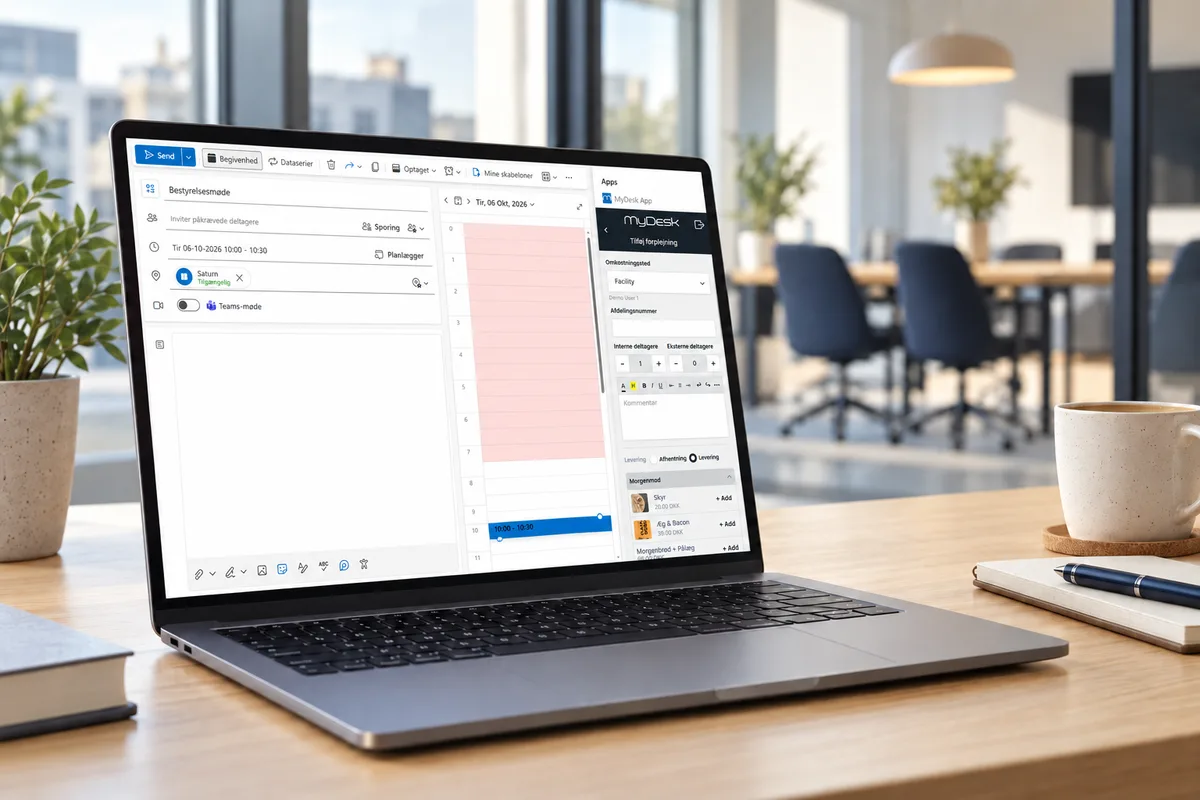
MyDesk combines meeting room selection with meeting planning in Outlook. Catering and guest registration can be connected once the relevant modules have been set up.
In short
With MyDesk, the employee can find and book a meeting room from Outlook. Room overview, calendar integration and booking rules are adapted to your office. The solution can also be used in Teams, on mobile and on the web.
From planning to everyday life
Select the time and participants in the calendar and find a room that suits the meeting.
Use the room overview and floor plan to find the right place. Capacity and rules are clarified in the setup.
Order meeting catering or pre-register external guests if you have the relevant modules.
Review time, venue, participants and any bookings. Agree with reception and canteen how changes are handled.
A setup that suits you
The customers' experiences
CEJ highlights the Outlook integration and support as reasons to choose the MyDesk.
Læs kundehistorienSchou brings together meeting booking, guests and catering and has a visual overview of 24 meeting rooms on four floors.
Læs kundehistorienQuestions and answers
MyDesk provides a visual overview of the room and the possibility to gather room selection, catering and guests around the meeting. Calendar connections, booking rules and modules are clarified in your setup.
They are related modules. Scope and price are agreed separately; meeting room booking is not in itself a license for all MyDesk products.
Compatibility must be clarified for the Outlook clients and the Microsoft environment you are using. Contact MyDesk with your clients, calendars and needs so that the setup can be assessed.
The process depends on your Microsoft environment, number of locations, selected modules and hardware requirements. Agree responsibility, testing and a concrete schedule with MyDesk; there is not one fixed implementation time for all offices.
The calculator shows the recommended software price for the selected solution. Hardware, other modules, consumption and specific terms of agreement must be clarified separately. Ask for a quote that breaks down ongoing software, hardware purchase or rental, and any start-up costs.
The Outlook can already schedule meetings and reserve rooms with the Scheduling Assistant and Room Finder in a supported Microsoft 365 or Exchange environment. MyDesk supplements this workflow with a visual overview of the office and the modules you choose.
| Workflow | Outlook | MyDesk |
|---|---|---|
| Meeting and premises | Outlook associates the invitation with a room reservation. | MyDesk adds a visual room overview and floor plan. |
| Catering and guests | The general meeting invitation collects participants and meeting time. | Related MyDesk modules can aggregate the ordering of meeting catering and pre-registration of guests around the meeting. |
| Booking rules and no-shows | Your calendar resources and their rules are included in the setup. | MyDesk can be set up with check-in and release of unused premises. Method, deadlines and any hardware are agreed separately. |
Start by clarifying your environment and work processes. Login, calendar connection and employee apps are different parts of the setup.
Your IT team and MyDesk review Microsoft 365, Outlook clients, locations and the modules you will use. Also designate the employees who must administer the solution.
Agree login via Microsoft Entra ID, relevant calendar resources and necessary rights. Microsoft Graph and OAuth 2.0 are used for the calendar integration; rights and connections must fit the specific solution.
Clarify floor plans, resources, booking rules and any messages or order deadlines. Reception and canteen are included when their modules are included.
Review representative bookings, changes and cancellations in the clients employees use. Then agree on onboarding, support and responsibility for changes.
The software price below is the starting point. An overall offer must also clarify the modules, the hardware and the terms of agreement that suit your office.
Example of software basis: 1.900 DKK per month · 10 meeting rooms. Calculated from the same list price and minimum limit as the calculator below.
Prices and calculation
Adjust quantity and see the recommended price immediately.
MyDesk
Get a demo with a focus on your employees, locations and Microsoft environment.