Plan production
View today's orders and plan your work.
MyDesk · Canteen administration
Give your kitchen an overview from the first order to the last delivery. See what, where and when, and keep up with changes as the day unfolds.
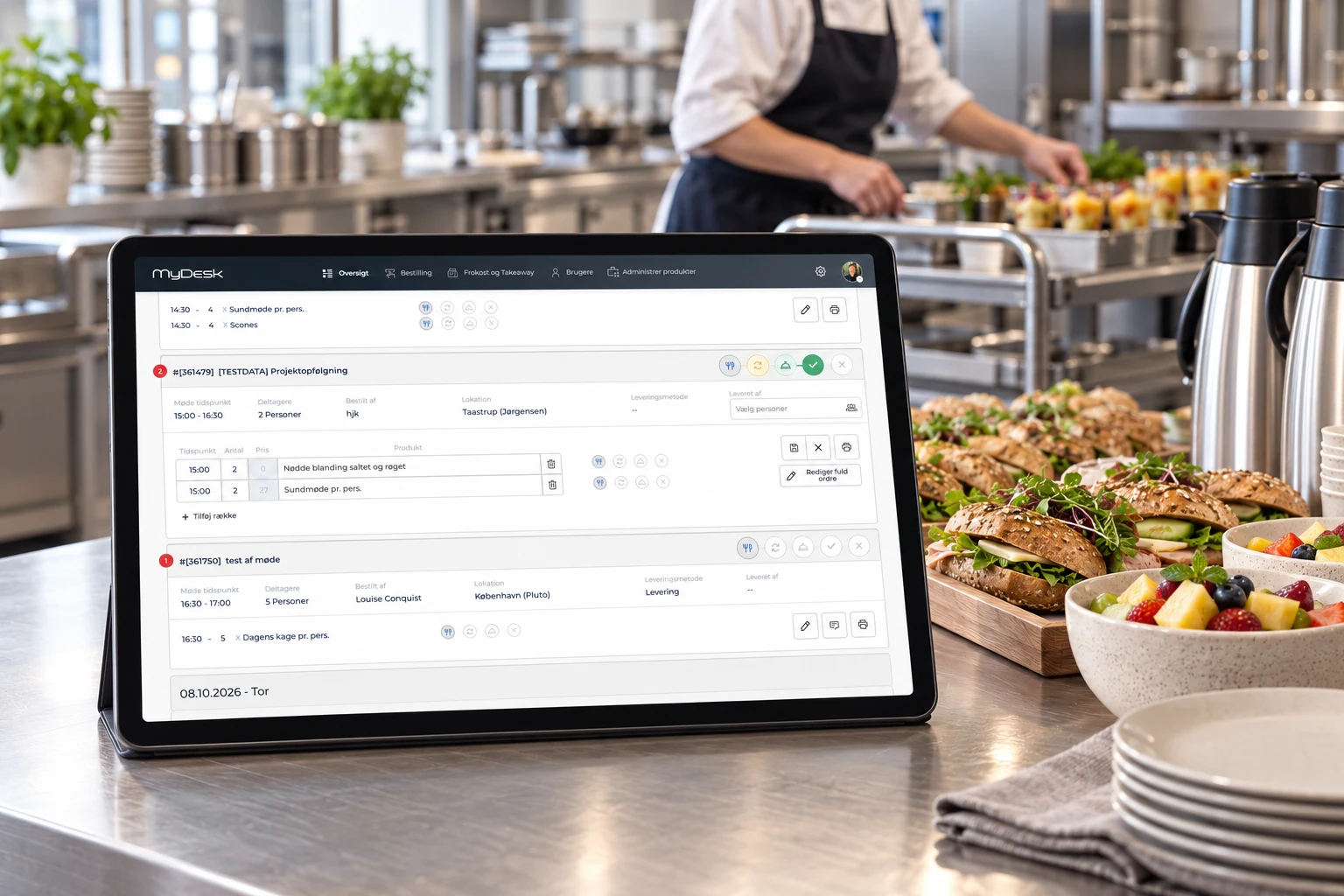
Time · Location · Quantity



















Meetings and catering
View today's orders and plan your work.
Keep an overview when orders change.
See the time, location and notes for each order.
Explore the possibilities
Change quantities and delivery times, add an item, and follow an order from receipt to delivery. Use the status icons on an order or an individual item.

Select the pencil on an order to edit it.
Lunch in the canteen
Employees can pay with an access badge, payment card or MobilePay. You can also choose payroll deduction with automatic registration.
MyDesk Touch screens can be used for lunch payments in the canteen. We help you choose payment methods and configure the solution.
Track canteen purchases and transactions, and use the overview for daily billing.
01 Requirements → 02 Setup → 03 Ready to useWe help you every step of the way
We agree the ordering process with you and help the kitchen get started with an overview that suits operations.
We discuss menus, delivery and daily planning.
Locations, products and ordering rules are prepared.
Canteen staff are introduced to the order overview.
Part of the whole office
Order food and drinks while planning your meeting. The canteen receives the time, location and order together so you can focus on your attendees.
Read moreGive reception and PAs a shared starting point. See meetings, find free time and manage the details that make the day run smoothly.
Read moreBring office data and AI into one view. Understand how desks and meeting rooms are used, ask questions about the patterns and find opportunities for a better working day.
Read morePrices and calculation
The administration module for the canteen is included in meeting catering. Mobile app for the canteen staff and financial integration are optional.
Features and options
Overview of Canteen administration and the options surrounding the solution.
| Feature / option | What it means for you | In your solution |
|---|---|---|
| Daily and weekly orders | Plan orders and production together. | In meeting catering |
| Changes and cancellations | Keep up as orders change. | Solution functionality |
| Delivery information | See the location, time and special requests. | Solution functionality |
| Menu administration | Tailor products to your needs. | Once configured |
| Canteen mobile app | Take the order overview with you. | Additional module |
| Billing and finance | Discuss finance system integration. | Additional module |
| Lunch payment | Pay with an access badge, card, MobilePay or payroll deduction. | Once configured |
| Purchases and transactions | Get an overview of canteen payments. | Once configured |
We agree scope, setup and optional extras with you. Hardware and related modules are discussed separately.
Good to know
Canteen administration is the kitchen overview in MyDesk's meeting catering solution. Employee orders are brought together here.
Yes. The overview supports order changes and cancellations.
Yes. Canteen staff can have their own mobile app as an additional module.
Lunch payment can be configured with an access badge, payment card, MobilePay or payroll deduction. We agree which methods you need and how registration and billing should work.
No. Registration helps the kitchen plan the number of meals. Payment involves recording and billing the purchase. We discuss both workflows with you.
Canteen administration
Book a demo to explore the options for your organisation.